


GigSmart Get Gigs
3.63.03K Reviews
App Specs
- Version
- 4.31.0
- Updated On
- License
- Free
- Downloads
- 1,000,000+
- Developer
- GigSmart, Inc.
- Categories
- Business
- Platform
- Android, iOS
Screenshots
 Analysis by AppCompare
Looking for short-term work can mean bouncing between listings, messages, and schedules, so I value tools that make the first step less cumbersome. GigSmart Get Gigs is a free business app from GigSmart, Inc. for people seeking local gig work. Its focus is practical: browse nearby opportunities, apply, and keep an eye on updates. I would treat it as one channel for finding shifts rather than a promise of steady income; the value depends on the jobs available where you live and whether their timing suits you.
Getting to Know GigSmart Get Gigs
Right off the bat, GigSmart Get Gigs catches your attention with its user-friendly interface. It’s designed to make the job search process as smooth as possible. You can tell the developers really thought about the user experience. The app feels intuitive, which is a huge win in my book. You don’t want to spend hours figuring out how to navigate an app when you could be landing gigs.
Its audience is broad: someone fitting occasional shifts around another job may use it differently from someone who relies on gig work as a main source of income. The app has an average rating of 3.8 from around 7,000 ratings, and it has been installed over a million times. Those figures suggest plenty of people have tried it, but they do not guarantee that the listings in your area will match your skills or schedule. I’d judge it by the quality and practicality of the opportunities I can actually see nearby.
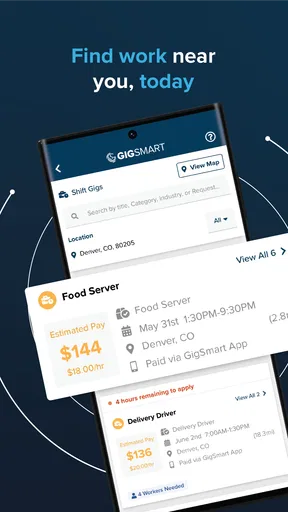
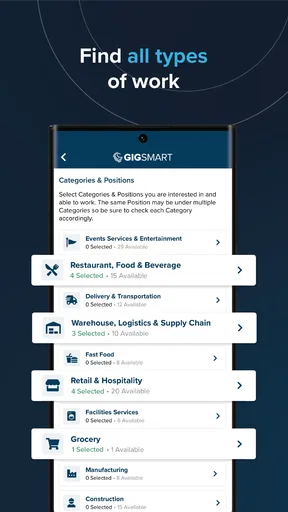
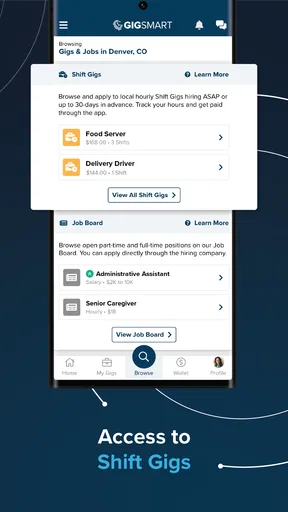
The app offers a wide variety of gigs, from hospitality and construction to healthcare and delivery services. It’s like a buffet of job opportunities, and there’s something for everyone. What’s even better is the app’s location-based feature. You can easily find gigs close to your area, which is super convenient if you’re looking to save on commute time.
Location is useful, but nearby does not automatically mean worthwhile. Before applying, I would compare the shift’s hours and location with the full travel time, not just the distance shown on a map. A job that looks convenient can become a poor fit if getting there requires a long connection or if the return trip falls outside your usual transport options. For anyone weighing several offers, treating commute time as part of the real commitment makes the choice clearer.
How It Works
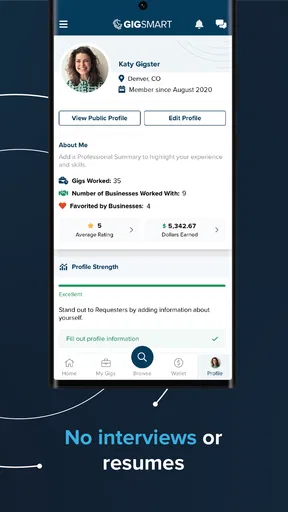
Setting up your profile is pretty straightforward. You fill in your basic details, select your skills, and voila! You’re ready to start browsing gigs. The app allows you to create a detailed profile, so potential employers know exactly what you bring to the table. Plus, you can upload documents like certifications, which adds a nice professional touch.
That profile is worth preparing carefully rather than rushing through it on a bus or between errands. I’d make sure the skills I select reflect work I am genuinely ready to do, and keep relevant certifications easy to find before I start applying. A clear profile can help an employer understand the match without a long back-and-forth. It also gives me a useful checklist: if a role appears to require a qualification I do not have, I can skip it instead of spending time on an application that is unlikely to fit.
Worth Reading Before You Choose

EA SPORTS FC Mobile 26 Is a Bigger Football Game, but It Takes Time

Flipboard Shows What News Apps Must Do Beyond the Feed

Switching to Android Auto Means Rethinking Your Driving Routine

Google Calendar Makes a Crowded Week Easier to Manage

Ludo King Makes the Most of the Minutes Between Plans

Baby Panda World Brings Quick Play to Modern Phones, but Its Game Library Feels Busy
One feature that stands out is the app’s real-time gig updates. It’s like having a personal job alert system that keeps you posted on the latest opportunities. You can apply to gigs with just a few taps, and the response time is usually pretty quick. It’s like job hunting on steroids, minus the stress.
Quick updates can be helpful when a shift fits a narrow opening in your week, but I would not let notifications make the decision for me. I’d open a promising listing when I have enough time to read it properly, check the hours and location, and make sure I can follow through if selected. A fast application is only useful when it is for work I can actually take. If I am already committed elsewhere, saving the time to review details calmly is better than reacting to every alert.
Making the App Work Around Real Life
A realistic use case is a student who learns on Monday that a class has been cancelled later in the week. They could check for a nearby shift that fits the newly open afternoon, compare its start and finish times with transport, and apply if the commitment is manageable. Someone with a regular job might use the same process to look for occasional work on a free day. In both cases, I would keep the app as a way to discover options, not assume that every search will produce a suitable offer.
For a more consistent routine, I’d set aside a short period to review opportunities instead of checking constantly. That makes it easier to compare shifts on the same terms: travel, timing, the skills requested, and whether the work fits around existing responsibilities. It also reduces the temptation to accept an inconvenient job simply because it appeared first. The useful habit is not applying as quickly as possible; it is knowing in advance what makes a gig worth taking.
The app is best suited to people who can consider short-term local work and are comfortable checking each opportunity individually. It may be less useful if you need a guaranteed weekly schedule, a specific role in a narrow profession, or a job that can be done entirely remotely. In those cases, I’d look at established job boards, direct employer applications, or specialist services as well. Those alternatives may make it easier to focus on longer-term openings or a specific field, while GigSmart’s appeal is the possibility of finding flexible local gigs.
The Good Stuff
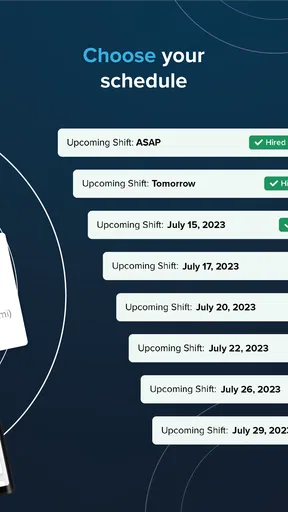
What I love most about GigSmart Get Gigs is its flexibility. You can pick and choose gigs that fit around your schedule. Whether you’re looking for a side hustle or something more consistent, the app has options. This kind of flexibility is perfect for students or anyone juggling multiple commitments.
That flexibility also comes with a trade-off: choosing shifts one by one asks you to stay organized. I’d keep a simple personal record of applications, confirmed commitments, and any questions I still need answered, especially if I’m looking across more than one work platform. It is easy to lose track when several possibilities appear at once. The app can help surface gigs, but I still need to manage my own availability and avoid accepting overlapping commitments.
The app also features ratings and reviews for employers, which is super handy. You can check out what other gig workers have to say before you commit. It adds a layer of transparency that’s often missing from gig platforms. Plus, knowing a gig has positive reviews gives you a little peace of mind.
I see employer feedback as one input, not a substitute for checking the terms of a specific shift. Reviews can help me form questions before I commit, while the listing and any direct communication should clarify the practical details I need for that job. A strong reputation cannot make an inconvenient schedule workable, and a thin review history does not by itself tell the whole story. The sensible approach is to use feedback to inform a decision, then make sure the individual opportunity suits me.
Readability, Navigation, and Different Ways of Using It
In my experience, the straightforward layout lowers the effort involved in moving from a profile to browsing and applying. That matters for people who are new to gig platforms, as well as anyone trying to check an opportunity during a spare moment. Still, a simple-looking interface is not the same as being easy for every person in every situation. Small text, a busy environment, or a rushed search can make reading job details harder, so I’d review important information when I can give it my attention.
There is also a practical difference between using the app for a quick scan and using it to make a commitment. A brief check can tell me whether anything nearby looks promising; a proper review deserves a quieter moment to examine the task, hours, and location. If reading on a phone is uncomfortable, I would avoid making a snap decision from a notification and instead return to the listing when I can focus. That is a useful habit for anyone who prefers more time to process information.
For motor or sensory needs, the app’s simple workflow may be less demanding than repeatedly navigating a complicated set of menus, but I would not assume that it removes every barrier. Applying still involves selecting information and responding to listings. Someone who finds repeated tapping difficult, or who needs a particular presentation or input method, should try the essential steps before relying on the app for time-sensitive work. The key test is not whether the first screen feels manageable, but whether browsing, reviewing, and applying remain comfortable over time.
A Few Quirks
Now, no app is perfect, and GigSmart Get Gigs has a few quirks. Occasionally, you might find discrepancies in gig details, such as pay rates or hours. It’s always a good idea to double-check these with the employer before committing. Also, while the app is free to download, some features might require in-app purchases or a premium subscription. It’s not a deal-breaker, but something to be aware of if you’re on a tight budget.
I would put special care into confirming any detail that affects whether I can accept a shift: the expected hours, the pay arrangement, the location, and what the work involves. If something in a listing seems inconsistent, asking before committing is more useful than trying to resolve it after planning the day around the job. This extra check takes time, so the app is not a perfect fit for someone who wants every opportunity to come with no follow-up at all.
When evaluating the cost, the app itself is free, so trying it does not require a purchase. Its current version is 4.21.0, and the age rating is Everyone. I would still make my decision based on whether the app’s opportunities suit my needs, rather than assuming that free access means every part of the work or every possible service will be cost-free. For everyday use, the most valuable investment is attention: verify the details and consider the effort required to reach and complete each gig.
Situational access matters too. A person with a reliable connection and time to check listings may find the quick browsing useful, while someone with limited data, an older device, or an unpredictable schedule may need to be more selective about when they search. GigSmart requires an operating system version 7.0 or later. The important question is whether it works comfortably on the device and in the circumstances you actually use, not simply whether it installs.
Who Should Look Elsewhere
I would skip relying on this as my only job-search route if I needed dependable, fixed hours or a specific long-term career path. A local gig app can broaden the range of short-term possibilities, but availability naturally depends on the area and the type of work being offered at the time. If I needed certainty about regular income, I’d combine it with direct applications to employers or other job-search channels rather than treating one app as a complete employment plan.
It may also be a poor match for someone who cannot take work on short notice, has little flexibility around transport, or needs detailed accommodations confirmed before applying. That is not a judgment on the worker; it is a reminder that flexible opportunities can still impose real constraints. I would first identify what conditions I need for a shift to be safe and practical, then use listings to see whether any meet them. If the details remain unclear, I would pause rather than feel pressured by an apparently quick opportunity.
For comparing alternatives, I think of general job boards as better for searching across longer-term roles and employer career pages as a direct route to a particular organization. GigSmart is more appealing when I want to check for flexible, local work without starting with a long-term position in mind. Neither approach replaces the other. Keeping more than one route open is especially sensible when local listings fluctuate or when a worker has a particular schedule, accessibility need, or income target.
Final Thoughts
Overall, GigSmart Get Gigs is a fantastic tool for anyone diving into the gig economy. Its user-friendly design, variety of job options, and flexible scheduling make it a standout choice. While it has a couple of minor hiccups, the positives far outweigh the negatives. If you’re looking to land gigs with ease and efficiency, this app should definitely be on your radar.
For me, the strongest reason to try it is the chance to find a local shift that fits a real gap in the week. Its weaker side is the work still required to confirm details and decide whether a listing is genuinely practical. The developer, GigSmart, Inc., has built an app aimed at gig workers, and the experience makes most sense when I use it as a flexible search tool while keeping my own checks and alternatives in place.
So, why wait? Dive into the gig economy with GigSmart Get Gigs and start exploring a world of opportunities right at your fingertips. Happy gig hunting!
I’d recommend giving it a try if local, flexible work is what you are looking for and you are comfortable assessing each shift before applying. I would not recommend depending on it alone for guaranteed hours or skipping the step of confirming important terms. Used with care, it can be a helpful way to discover possibilities; the best choice is still the one that fits your time, travel, abilities, and actual needs.
Pros
- User-friendly interface for easy navigation.
- Wide variety of gigs across industries.
- Real-time job alerts and notifications.
- Integrated chat for direct communication.
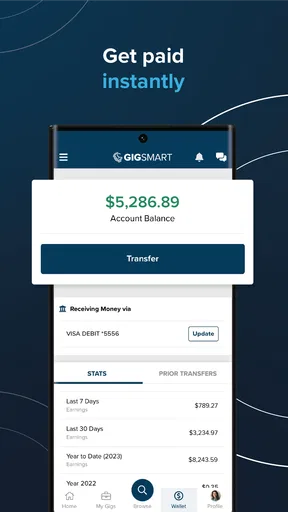
- Secure payment system ensures timely pay.
Cons
- Limited gigs in rural areas.
- Some gigs require specific certifications.
- Occasional app glitches reported.
- Payment delays for certain gigs.
- High competition in popular job categories.
FAQs for GigSmart Get Gigs
What is GigSmart Get Gigs, and how does it work?
GigSmart Get Gigs is a mobile app designed to connect gig workers with potential employers seeking short-term or freelance jobs. Users can create a profile showcasing their skills, browse available gigs, and apply for positions that match their expertise. The app facilitates seamless communication between workers and employers, ensuring a hassle-free hiring process.
Is GigSmart Get Gigs free to use?
Yes, GigSmart Get Gigs is free to download and use. While creating an account and applying for gigs doesn’t cost anything, the app may offer premium features or services at an additional cost. Always check the app's specific terms and conditions for any potential fees associated with your use or transactions.
What types of gigs are available on GigSmart Get Gigs?
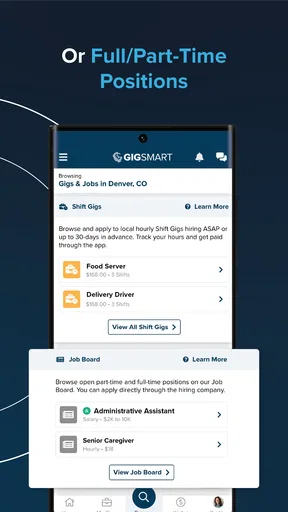
GigSmart Get Gigs offers a wide variety of job categories, including delivery, hospitality, construction, and administrative roles. Whether you're seeking part-time work or a one-time project, the app provides numerous opportunities to match your skills and schedule, making it a versatile tool for gig workers.
How does GigSmart ensure the safety and security of its users?
GigSmart prioritizes user safety by implementing various verification processes. Both gig workers and employers undergo background checks, and the app offers in-app messaging to keep personal information private. Additionally, users can rate and review each other, contributing to a community-driven trust system.
Can I use GigSmart Get Gigs on both Android and iOS devices?
Yes, GigSmart Get Gigs is available on both Android and iOS platforms. You can download it from the Google Play Store for Android devices and the Apple App Store for iOS devices. Ensure that your device meets the app's system requirements for optimal performance.


